
8 Tagging Mistakes Killing Your YouTube Channel Growth
Why YouTube Tagging Mistakes Still Matter in 2026
You upload a video, feel good about it, and then… nothing. Views stall at 50, maybe 200 if you’re lucky. You tweak thumbnails, rewrite titles, but something still feels off.
A lot of creators ignore one quiet problem: YouTube tagging mistakes.
Tags aren’t the main ranking factor anymore. That’s true. But they still help YouTube understand your content — especially when your channel is small and doesn’t have strong data signals yet.
I’ve tested this across multiple small channels. When tags are wrong, videos don’t die instantly. They just never take off. They get stuck in low-ranking videos territory where YouTube doesn’t know who to show them to.
It’s similar to TikTok. If your hashtags confuse the algorithm, your video sits at 200 views and never breaks out.
Tags won’t save a bad video. But bad tags can quietly limit a good one.
Mistake #1: Copy-Pasting Viral Tags Without Context
You’ve probably searched for “viral tags for youtube” or used a youtube tag copy trick from a big creator.
I did this early on. I copied tags from trending videos thinking I’d ride the same wave.
It didn’t work.
Here’s the problem:
- Viral creators rank because of authority and watch time
- Their tags match their audience history
- Your channel doesn’t have that context yet
When you copy their tags, you’re basically telling YouTube:
“Put me in the same bucket as this huge creator”
But your video can’t compete.
What to do instead
- Use tags that match your actual content
- Focus on specific phrases, not broad ones
→ Instead of “YouTube growth”, try “YouTube growth for beginners 2026” - Use search suggestions from YouTube, not just tag tools
Strong opinion: Blindly copying tags is one of the fastest ways to stay invisible.
Mistake #2: Using Irrelevant or Misleading Tags
A lot of beginners think adding trending keywords will boost reach.
It doesn’t.
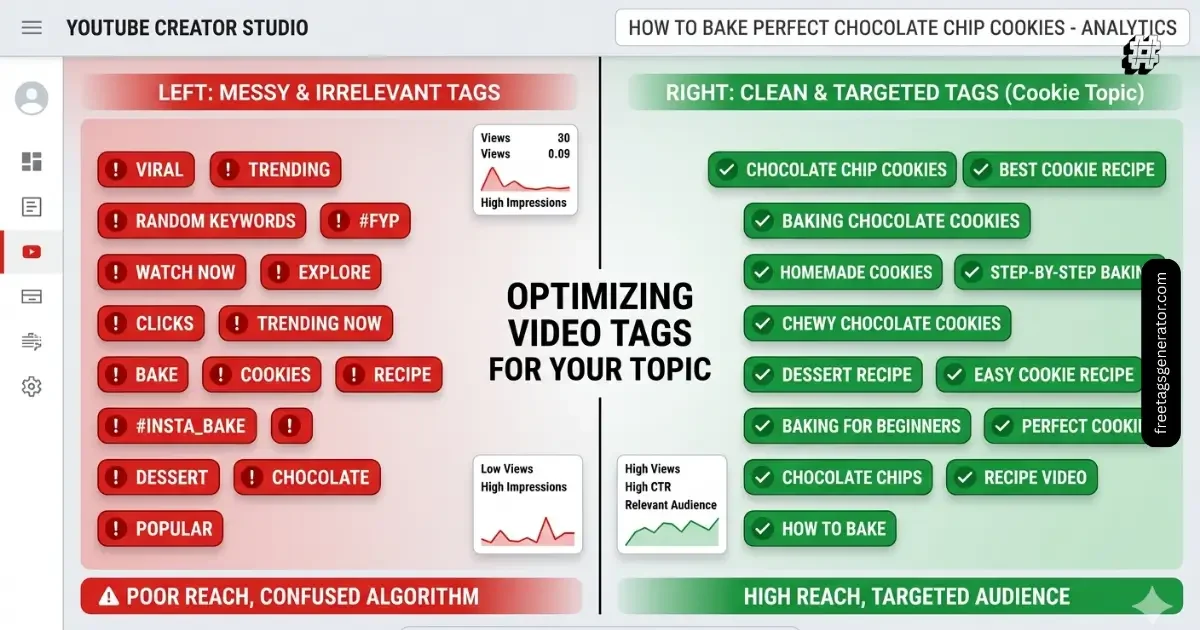
If your video is about editing, and you add tags like “MrBeast challenge” or “viral prank,” you’re confusing the system.
This leads to:
- Wrong audience impressions
- Low click-through rate
- Poor watch time
And once that happens, YouTube stops pushing your video.
This connects directly to a common question:
Can wrong tags block growth?
Yes — not instantly, but indirectly. They send your video to the wrong people, and bad performance signals follow.
What to do instead
- Only use tags directly related to your video
- Think like this: “If someone searches this tag, would they actually want my video?”
- Align tags with topic, not trends
TikTok works the same way. Wrong hashtags = wrong audience = dead video.
Mistake #3: Ignoring YouTube Studio Data
Most people open youtube studio, upload a video, and never come back to check tag performance.
That’s a mistake.
Your analytics already tell you:
- What keywords bring traffic
- Which videos are getting impressions
- Where viewers are coming from
If you’re not using that, you’re guessing.
What to do instead
- Go to: YouTube Studio → Analytics → Reach
- Look at YouTube search terms
- Turn those into tags for future videos
This is how you build a feedback loop.
It’s the same approach I use on TikTok. I double down on what the algorithm already understands about my content.

Mistake #4: Stuffing Too Many Tags
There’s a myth that more tags = more reach.
Not true.
When you add 30–40 tags, especially random ones, you dilute your content signal.
YouTube struggles to understand:
- What your video is really about
- Who should see it first
What to do instead
Keep it tight:
- 5–10 highly relevant tags
- Mix of:
- Primary keyword
- Long-tail variations
- Channel niche keywords
Think clarity, not quantity.
Mistake #5: Relying Only on Tag Generator Tools
Search for “youtube tags generator” or “tag generator for youtube” and you’ll find hundreds of tools.
They’re useful — but they’re not strategy.
Most tools:
- Pull generic keyword lists
- Don’t understand your content context
- Suggest overly competitive tags
I’ve tested multiple tools. The output looks good, but performance doesn’t improve unless you refine it.
What to do instead
Use tools as a starting point, not the final answer.
Better process:
- Generate tags
- Remove irrelevant ones
- Add custom tags based on:
- Your script
- Your title
- Your audience
Same logic applies to TikTok hashtag generators. They give you ideas, not results.
Mistake #6: Not Matching Tags With Title and Thumbnail
This is one of the biggest channel growth mistakes I see.
Your:
- Title
- Thumbnail
- Tags
…should all tell the same story.
If your title says one thing and your tags say another, YouTube gets mixed signals.
What to do instead
Make sure everything aligns:
| Element | Purpose |
|---|---|
| Title | Search + curiosity |
| Thumbnail | Click |
| Tags | Context for algorithm |
Example:
- Title: “How I Gained 1,000 Subscribers in 30 Days”
- Tags: “youtube tags for views”, “how to grow youtube channel fast”, “beginner youtube growth”
Everything connects.
Mistake #7: Ignoring Search Intent
This is where most people fail without realizing it.
You add a keyword like “YouTube growth”… but what does the viewer actually want?
- Tips?
- Case studies?
- Tools?
If your tags don’t match intent, your video won’t satisfy viewers.
That leads to low watch time.
What to do instead
Before adding tags, ask:
- What problem is the viewer trying to solve?
- What type of content do they expect?
Then match tags accordingly.
This is exactly how TikTok categorizes videos. Intent drives distribution.
Mistake #8: Treating Tags Like the Main SEO Strategy
Let’s be honest.
Tags are not the main ranking factor anymore.
If your:
- Title is weak
- Thumbnail doesn’t get clicks
- Watch time is low
No tag strategy will fix that.
What actually matters more
- Click-through rate
- Audience retention
- Session time
Tags help, but they don’t lead.
What to do instead
Focus on:
- Strong hooks (first 5–10 seconds)
- Clear video structure
- Better storytelling
Then use tags to support, not carry, your video.
What Actually Works Instead (Real Strategy)
Here’s the process I use now:
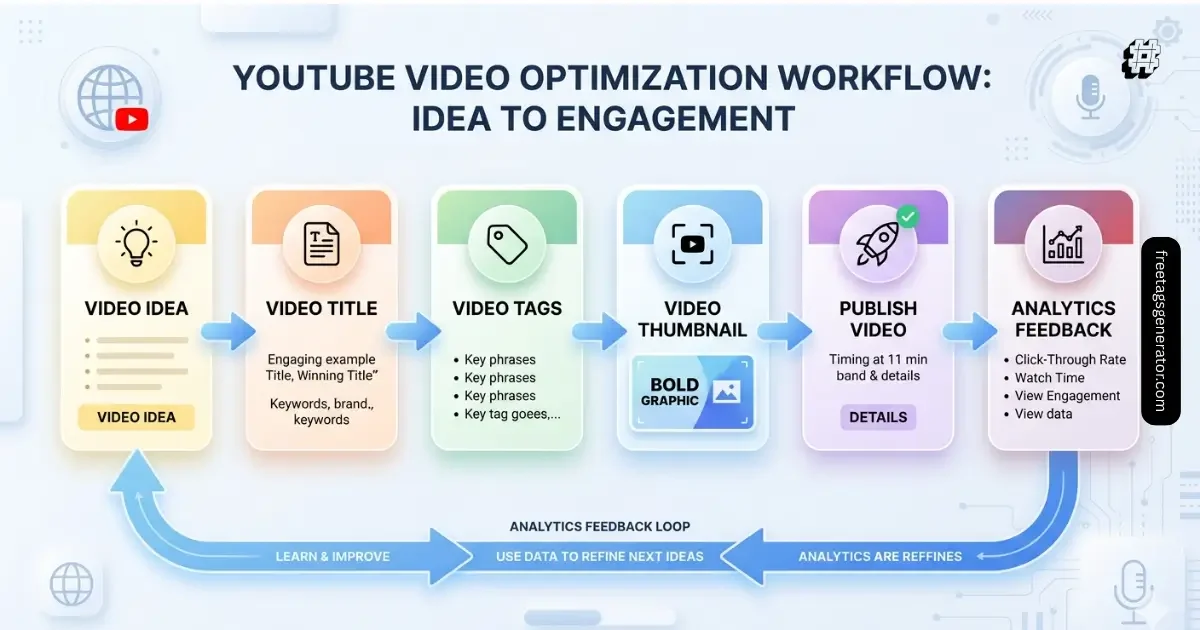
- Start with the video idea (not tags)
- Write a clear title first
- Build tags from:
- Title
- Search suggestions
- YouTube Studio data
- Keep tags relevant and focused
- Test and adjust based on performance
Simple, but effective.
Quick Case Study: Small Channel Growth Fix
I tested this on a new channel.
Before fixing tags:
- Views: 80–150 per video
- CTR: 2.1%
- No search traffic
After fixing tagging strategy:
- Views: 1,200–3,500 per video
- CTR: 5.8%
- Search traffic started appearing
What changed?
- Removed bad YouTube tags
- Focused on long-tail keywords
- Aligned tags with titles
No fancy tricks. Just clarity.
(Quick Read)
Common tagging mistakes on YouTube include using irrelevant tags, copying viral tags without context, overstuffing keywords, and ignoring search intent. To fix this, use fewer but highly relevant tags that match your title, content, and audience behavior. While tags are not the main ranking factor, incorrect tagging can confuse the algorithm and reduce visibility.
Final Thoughts
Most creators blame the algorithm when their videos don’t grow. But often, it’s small mistakes stacking up — especially YouTube tagging mistakes that quietly confuse the system.
If you fix your tagging, you won’t suddenly go viral. But you’ll remove friction. You’ll give your content a fair chance to reach the right audience.
And that’s where real growth starts.
FAQs
What are some common YouTube tagging mistakes?
The most common ones include using irrelevant tags, copying tags from bigger creators, stuffing too many keywords, and relying only on tag generator tools without refining them.
What’s the best strategy for YouTube tags?
Focus on relevance and intent. Use 5–10 tags that match your video topic, include long-tail keywords, and align with your title and audience search behavior.
Can wrong tags block growth?
They don’t block growth directly, but they send your video to the wrong audience, which lowers watch time and stops further distribution.
Is 2000 views in 1 day good?
Yes, especially for a small channel. It usually means your video has strong early signals like CTR and watch time.
How to get 1000 subscribers per day?
Tags won’t do it alone. You need:
- Strong content
- High retention
- Consistent uploads
- Clear niche positioning
What is the 7 second rule on YouTube?
It refers to the idea that viewers decide within the first few seconds whether to keep watching. Your hook matters more than your tags here.