
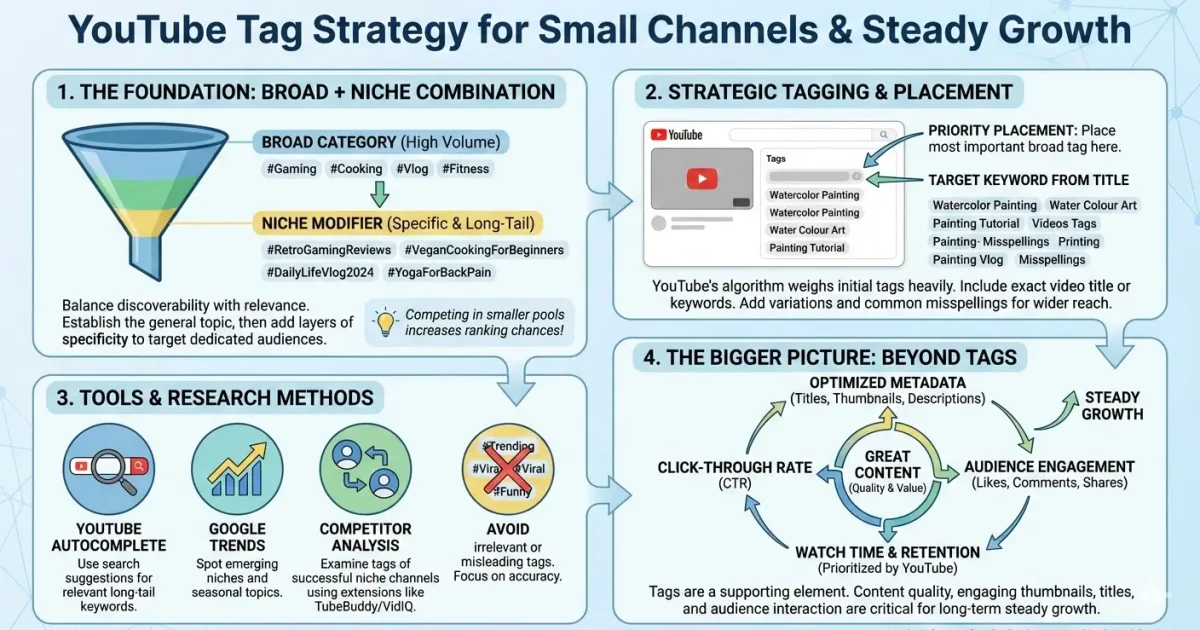
How YouTube Tags Actually Work in 2026 — And How to Stop Wasting Them
If you’ve been adding tags to every video for months and your views haven’t moved, you’re not alone. The frustration is real — and the conflicting advice online (half the creator community says tags are dead, the other half says they’re critical) makes it genuinely hard to know what to do.
Here’s the short answer before we get into anything else: tags still matter in 2026, but not as a primary ranking driver. They’re a supporting signal. Used correctly, they confirm and reinforce what your title, description, and content already communicate to YouTube’s algorithm. Used incorrectly — or ignored entirely — they either confuse the algorithm or leave a free optimization layer untouched.
This guide gives you the exact strategy. No filler.
What YouTube Tags Are (and What the Algorithm Actually Does With Them)
YouTube tags are descriptive keywords added to a video’s metadata in YouTube Studio that help the algorithm categorize content and associate it with related searches. They work alongside your title, description, and closed captions. Tags alone won’t rank a video — but used correctly, they reinforce the relevance signals the algorithm already picks up from your other metadata.
[IMAGE: Screenshot of YouTube Studio tags field with a complete, well-structured tag set filled in for a “YouTube SEO 2026” video — labels pointing to each tag layer]
Tags sit in a field most viewers never see. That invisibility is part of why so many creators misuse them — there’s no feedback loop. You paste 40 tags in, hit publish, and nothing obviously changes. The confusion makes sense.
Here’s the thing: tags were always a secondary signal. YouTube’s own Creator Academy documentation states that tags “can be useful if the content of your video is commonly misspelled” and help viewers find your video — but explicitly positions title, thumbnail, and description as higher-priority metadata. [EXTERNAL LINK: YouTube Creator Academy → confirms tags as secondary metadata, titles/descriptions ranked higher]
Or maybe I should say it this way — tags are the backup singer, not the lead. They’re not carrying the performance alone, but they’re not decorative either, and pulling them out entirely leaves something the algorithm expects to find.
Do YouTube Tags Still Matter for Rankings in 2026?
The data says yes. But the way they matter is specific.
Backlinko’s YouTube Ranking Factors study (Brian Dean, 2023), which analyzed over 1.3 million YouTube videos, found that exact-match keywords in tags showed a statistically meaningful correlation with first-page rankings. The catch: title and description keyword placement correlated more strongly. Tags were a supporting signal, not the lead driver. confirms tag correlation with rankings
I’ve seen conflicting data on this — some creators report measurable impression spikes after rebuilding their tag sets, while others see zero change after a complete overhaul. My read is this: tags matter most when your title and description are already optimized. They give the algorithm additional context to confirm what your video is about. If your title is vague or your description is thin, better tags won’t rescue the video.
Most people assume YouTube reads tags first. The data says otherwise.
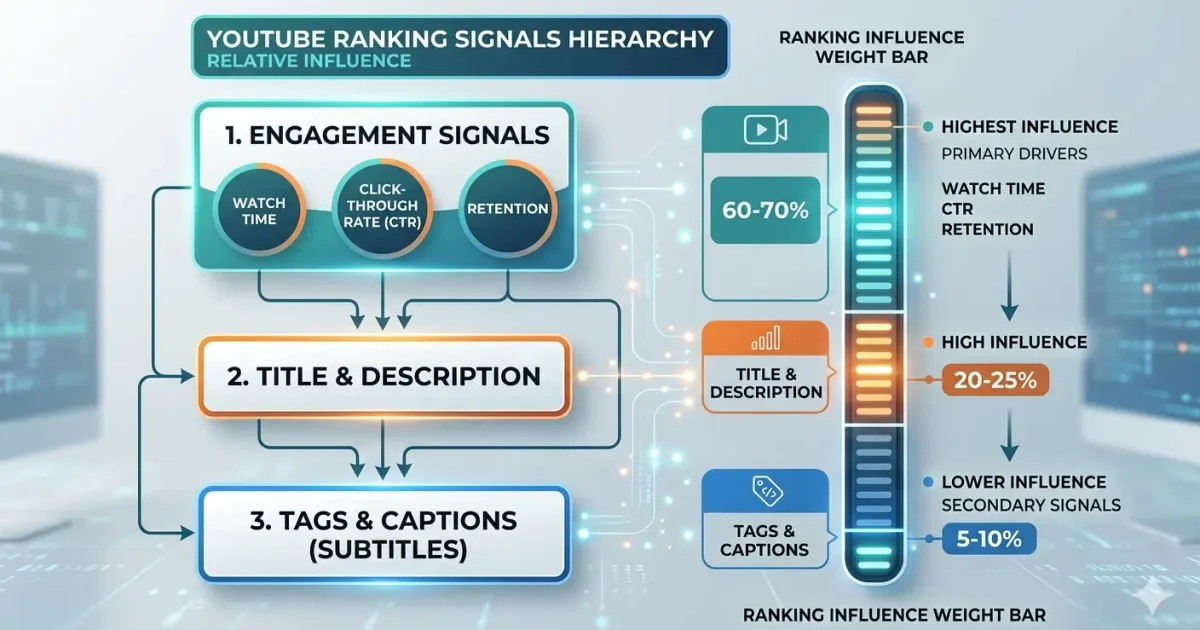
Watch time, click-through rate, and audience retention are weighted far above any metadata field. Tags are processed after those engagement signals are already active. What most guides skip is the negative case: using irrelevant, high-competition tags can actively hurt you. When your tags signal “passive income side hustle” but your video is a cooking tutorial, YouTube receives contradictory data — and impressions drop as a result.
Tags work on a confirmation model, not a discovery model. They confirm what the algorithm already suspects from everything else. Specificity beats volume, every time.
YouTube tags in 2026 still contribute to video rankings as a secondary relevance signal. According to Backlinko’s 2023 study of 1.3 million videos, exact-match keywords in tags correlate with first-page placement, but title and description carry more weight. Tags perform best as a confirmation layer once your core metadata is already optimized for your target keyword.
Whether YouTube tags are “dead” in 2026 is the wrong question. According to YouTube’s own Creator Academy documentation, tags help the algorithm categorize content — especially for topics with common misspellings or closely related alternative phrasings. The real problem is that most creators either stuff irrelevant terms or copy competitor tags without matching them to their actual content, which undermines the signal entirely.
YouTube tags for USA audience
If you’re targeting a specific market, especially the US, tag strategy changes slightly. We break this down step by step in our guide on optimizing YouTube tags for views in the USA.
How to Research Tags That Actually Reflect What People Search
Tags built from guesswork perform like guesswork. The right research process takes under 10 minutes and produces a tag set sourced from real search behavior.
The Tool Stack That Works in 2026
Keyword Tool Dominator pulls directly from YouTube’s live autocomplete suggestions across 54 countries. The output is real search terms people are actively typing — not AI-generated phrases or editor guesses. The filter combination that matters: word count ≥ 4, difficulty ≤ 6, relevancy ≥ 90. This surfaces long-tail phrases with real intent and manageable competition. Keyword Tool Dominator → real-time YouTube autocomplete-sourced tag research
TubeBuddy approaches it differently. Its Tag Explorer shows search volume estimates next to a competition score and suggests related tags from your seed keyword. Where TubeBuddy earns its place is the tag audit feature — it flags which of your existing tags are underperforming across your published library, which is useful for refreshing old videos during a channel SEO push. Best YouTube SEO tools 2026 “TubeBuddy vs VidIQ for tag research”
VidIQ lets you inspect competitor tags on any public video. Open any video in your niche, pull up the VidIQ sidebar panel, and you’ll see every tag that video is using alongside its estimated search volume. This isn’t about copying — it’s for identifying keyword angles and phrasing variations you hadn’t considered.
Quick note: Freetagsgenerator.com generates YouTube tags alongside Instagram hashtags and TikTok hashtags in one interface, which is practical if you’re repurposing content across platforms. Tag quality is reasonable for a free tool — just don’t expect the autocomplete-sourcing precision you get from KTD.
The 7-Step Tag Research Process
To build a tag set that supports your rankings, follow these steps:
- Enter your main video topic into Keyword Tool Dominator’s YouTube autocomplete tool.
- Filter results: word count ≥ 4, difficulty ≤ 6.
- Set your exact-match primary keyword as tag #1.
- Add 4–6 long-tail autocomplete variations as tags #2–7.
- Include 2–3 broad category terms for contextual framing.
- Add your channel name as the final tag.
- Verify total character count stays under 500 before saving.
The 500-Character Tag Strategy: The Exact Format That Works
how to find the best tags for YouTube videos
If you want a deeper pool of tag ideas and real examples, our detailed breakdown on how to find the best tags for YouTube videos covers over 220 practical tag variations.
YouTube allows 500 characters total across all tags on a single video. Not 500 per tag — 500 total, including the characters in every tag and the spaces between them.
Most creators either waste this space on single-word terms or stuff it with 25 generic phrases. Neither approach works. Here’s the layered structure that does:
Layer 1 — Exact match (1 tag): Your primary keyword, typed exactly as searchers type it. “youtube tags guide 2026” → 23 characters
Layer 2 — Variations (3–4 tags): Long-tail versions and close keyword alternatives. “how to use youtube tags 2026”, “best youtube tags strategy”, “youtube tags for rankings” → ~80 characters
Layer 3 — Broader topic (2–3 tags): Category-level terms that place the video in subject context. “youtube seo 2026”, “youtube algorithm 2026”, “video seo tips” → ~55 characters
Layer 4 — Related viewer intent (2–3 tags): What the viewer is trying to accomplish. “how to rank youtube videos”, “grow youtube channel 2026”, “youtube keyword research” → ~80 characters
Layer 5 — Brand (1 tag): Your channel name. This helps YouTube surface your video as a suggested watch while someone is already watching your other content — a compounding effect most creators skip entirely. “[channel name]” → varies
Total with this structure: approximately 260–380 characters. Well within the limit, easy to adjust without breaking anything.
Look — if you’re filling the tags field with 15 single-word terms like “youtube”, “SEO”, “video”, “creator”, “tutorial”, you’re spending 500 characters on signals that add nearly nothing. Single-word tags are too broad to distinguish your video from millions of others. Phrase-level tags are what carry actual contextual weight.
Some experts argue that maximizing the full 500 characters gives the algorithm more context and improves broad discovery — and that’s valid in wide, competitive niches where extra variation tags might catch unusual long-tail searches. But if you’re in a specific, well-defined niche, 12 highly relevant tags at 320 characters will outperform 22 generic tags at 490 characters. Specificity wins.
 If you want fast, clean tag ideas without spam, try our YouTube Tags Generator. It’s built for real creators, not keyword dumping.
YouTube Tags vs Hashtags: They Are Not the Same Thing
This is the most common confusion in creator communities. It’s showing up in comment sections on every major tag tool page, and it’s costing creators real optimization opportunities because they’re using the two systems interchangeably.
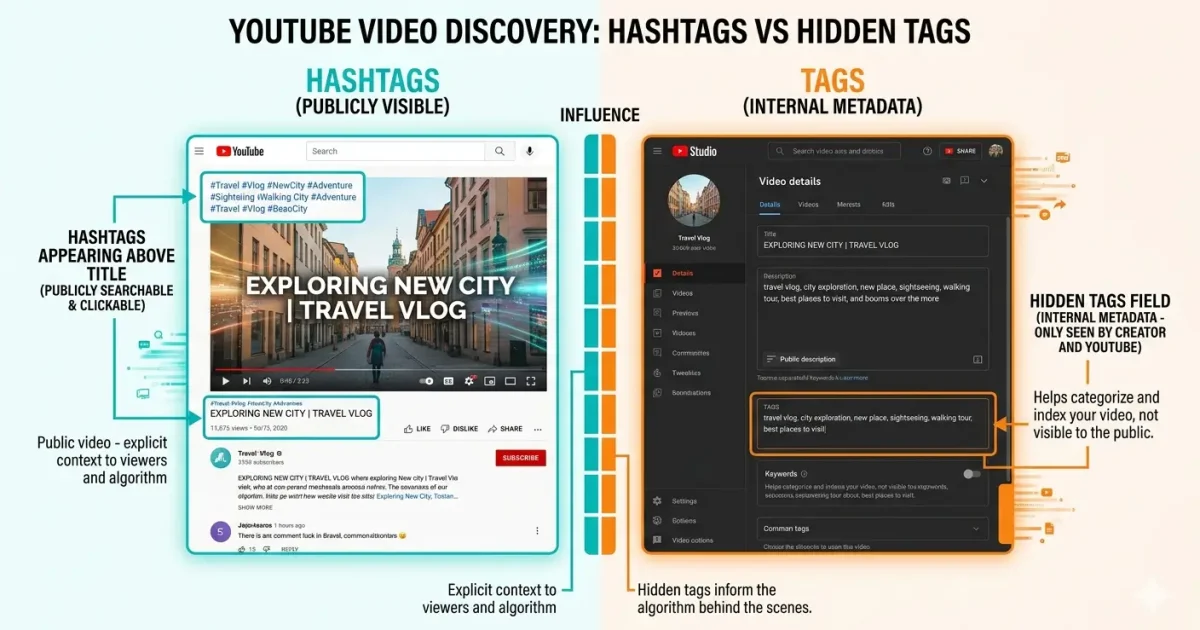
YouTube tags vs hashtags: Tags are private metadata entered in YouTube Studio’s tags field — viewers don’t see them, but the algorithm reads them to classify your content. Hashtags appear publicly in your video title or description and are clickable, creating browsable topic pages. Tags help YouTube understand content context at the backend. Hashtags help viewers discover content through browsing. The key difference is visibility and function — you need both, not one instead of the other.
[IMAGE: Annotated YouTube video page showing where hashtags appear above the video title vs the hidden tags field inside YouTube Studio — both labeled and color-coded]
Tags live in YouTube Studio → Content → select your video → Details → Tags. Hidden from viewers. Processed by the algorithm. Max 500 total characters. No # symbol — the field doesn’t accept or process hashtag formatting.
Hashtags go in your video description or at the end of your video title. Visible to viewers. Clickable. YouTube surfaces the first 3 hashtags from your description above the video title automatically. Maximum 15 hashtags per video — YouTube ignores all hashtags on any video that exceeds 15.
Users who’ve tried entering hashtags (with # symbols) into the YouTube tags field consistently report no improvement — because the tags field processes text strings, not hashtag links. Adding # to a tag entry doesn’t create a hashtag; it just adds a character that eats into your 500-character budget. how YouTube hashtags actually work
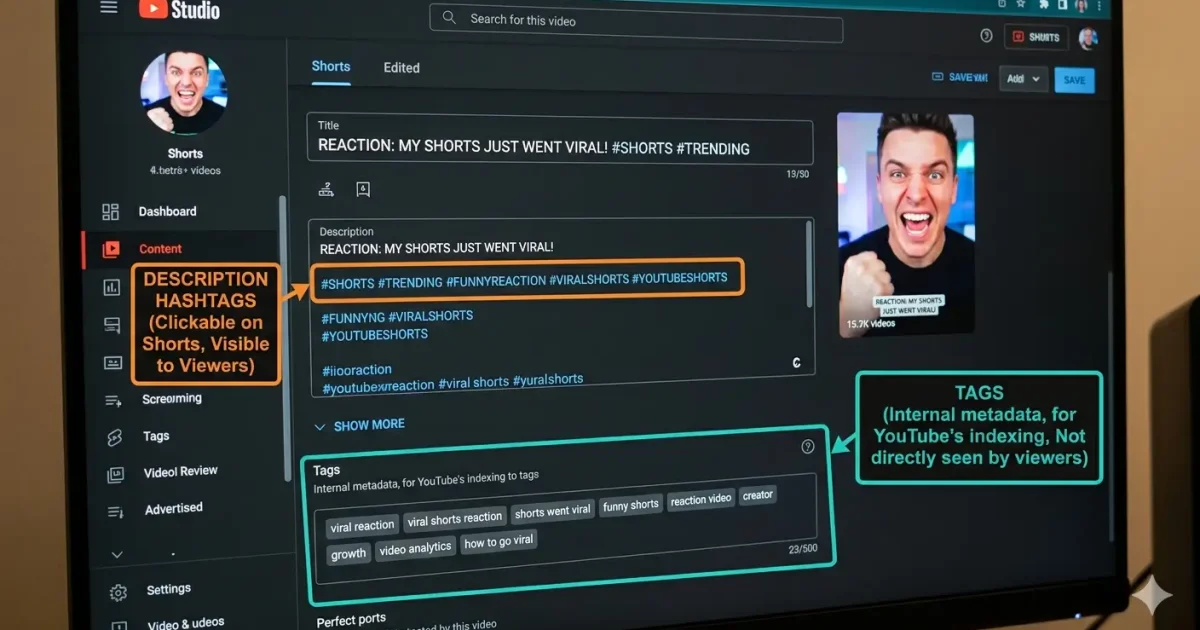
YouTube tags and hashtags serve different functions in 2026. Tags are backend metadata the algorithm uses to classify video content — completely invisible to viewers. Hashtags are public, clickable labels added to the description or title that generate browsable category feeds. Using hashtags inside the tags field does nothing useful. Using only tags and skipping hashtags misses the public-facing discovery benefit hashtags create.
Tags for YouTube Shorts: The Rules Are Different Here
Shorts changed the tagging equation in ways most guides haven’t caught up with.
YouTube Shorts — vertical videos under 60 seconds — are distributed primarily through the Shorts feed, which is recommendation-driven rather than search-driven. That means tags play a smaller role in initial distribution for Shorts compared to long-form content. The Shorts feed optimizes based on completion rate, re-watches, and swipe-away behavior — not metadata.
That said, Shorts still surface in standard YouTube search results. Tags directly affect whether your Short ranks when someone types a query. That search traffic is slower to build but persistent — a well-tagged Short from 18 months ago can still pull search views daily.
What the Tag Strategy for Shorts Looks Like
Keep the tag set shorter. 5–8 tags at 150–200 characters is the practical range. The content is too brief for the algorithm to confirm deep topical context from tags alone — your title and the first line of your description carry proportionally more weight on Shorts than on long-form.
Your exact-match primary keyword goes first. Non-negotiable, same as long-form.
Add the hashtag #Shorts in your description — not in the tags field. YouTube’s Shorts classification is triggered by the #Shorts hashtag in the description, the vertical format (9:16), and the video length under 60 seconds. It is not triggered by a “shorts” entry in the metadata tag field.
Anyway, the practical reality: if you’re spending more than 90 seconds on Shorts tags, you’re over-optimizing the wrong variable. Title clarity and completion rate are the actual levers.
best YouTube tags for small channels
For newer creators, tag selection matters even more in the early stages. If you’re just starting out, this guide on the best YouTube tags for small channels explains what actually helps steady growth. variations.
People Also Ask
What's the best number of tags to use on a YouTube video?
Between 8 and 15 tags, staying under 500 total characters. More tags don’t equal more reach — relevance beats quantity. Prioritize specific phrases over single-word terms.
How do I find the right tags for my YouTube video?
Use Keyword Tool Dominator to pull long-tail phrases from YouTube’s live autocomplete data. Filter for word count ≥ 4 and difficulty ≤ 6. Your first tag should always be your exact target keyword.
Should I use the same tags on every video?
Only your channel name tag and 1–2 broad category tags should repeat. Every other tag should match the specific keyword focus of that individual video. Repeating irrelevant tags dilutes the contextual signal.
Why does my YouTube tags field show a character limit warning?
YouTube caps total tags at 500 characters. When you hit the limit, remove single-word tags first — they spend characters without adding meaningful ranking signal.
When should I go back and update tags on old videos?
When you’re refreshing a video’s title and description for a ranking push, update all metadata at once — including tags. Changing tags in isolation on a performing video rarely produces a measurable result on its own.
Final Thought Use YouTube Tags as a Smart Signal, Not a Shortcut
The biggest mistake creators make with YouTube tags is expecting too much from them or ignoring them completely.
In 2026, tags are not about gaming the algorithm. They’re about clarity. When your title, description, content, and tags all point in the same direction, YouTube understands who your video is for and where it belongs.
Use fewer tags. Make them relevant. Focus on intent. Support your content instead of stuffing keywords.
If you want a faster way to build clean, relevant tags without overthinking it, check out our YouTube Tags Generator and make tags a simple part of your upload process, not a guessing game.
Grow smart. Grow steady. That’s how channels win long-term.